How to Turn a YouTube Video Into a Blog Post That Ranks in 2026
To turn a YouTube video into a blog post that ranks, take notes from the video instead of pasting its transcript. Write down the points it makes, two or three sentences worth quoting, and what is on screen. Then write the page for the search phrase, answer first, embed the video under the answer, add VideoObject schema, and use frames as the images.
A blog post built from a video is a page that answers a search in text and carries the video as evidence, not a text copy of the video. This post is built on YouTube's help on transcripts, Google Search Central's documentation on video and VideoObject, and the W3C's guidance on transcripts. It also draws on the Princeton paper on what generative engines quote, and on the video notes we built for our own writing tool.
Why does a transcript dump not rank?
A transcript is speech written down, and speech does not answer a search. It opens with "hey everyone", circles the point three times, and never says in one paragraph what the searcher typed. Google ranks pages that answer; a transcript dump makes the reader do the work the writer skipped.
The W3C says what a transcript is for. "Basic transcripts are a text version of the speech and non-speech audio information needed to understand the content", an accessibility aid for people who cannot hear the video. That is a good reason to publish one on the video's own page. It is not a blog post: it has no opening answer, no headings phrased as questions, no sources, and no structure a passage can be lifted from.
Google's helpful content page asks whether content provides "original information, reporting, research, or analysis". It asks whether the content shows "expertise that comes from having actually used a product or service". A video of you explaining your work is exactly that first-hand experience; the transcript is the wrong container for it.
How do you get the transcript from YouTube?
Open the video on a computer and, in the description, click "Show transcript". YouTube's help says "you can see the full transcript of any video that has captions". Copy it into a document, then check every name, number and product term against the audio. The captions may be automatic, and in our experience automatic captions mis-hear names and numbers.
The steps we follow:
- Open the transcript from the video description and copy it into a document.
- Check names, numbers and product terms against the audio, and fix them.
- Mark the sentences worth quoting, with their timestamps; YouTube lets you "click any line of caption text to jump to that part of the video".
- Mark what is on screen at the moments you will want as images.
How do you turn a YouTube video into a blog post that ranks?
Turn the transcript into notes, the notes into an outline built on the search phrase, and the outline into a page that answers first. The notes are the step people skip, and they are what separates a page from a dump.
Here is what the notes hold, and where each part lands on the page:
| From the video | What you write down | Where it goes on the page |
|---|---|---|
| The one-line point | A short summary in your words | The 40 to 60 word opening answer |
| Specific points | Eight to fifteen, one line each | The H2 sections, each as a question people type |
| Every figure stated | The number, and where the speaker got it | Linked to its source, or attributed to the speaker as first-hand |
| Sentences worth quoting | Two to five, word for word, with timestamps | One or two quotes, attributed to the speaker |
| What is on screen | At a quarter, half and three quarters through | The post's images, with alt text describing the frame |
Then write for the search, not the video. Pick the phrase a person would type to find what the video explains, read the first page for it, and let the sections cover what those pages miss. The video's order is for watching; the page's order is for answering. Our guide to writing a blog post that gets quoted by AI has the section rules.
PARCHMNT is a writing tool that researches what ranks for a search, writes the page, checks every claim and tracks where it lands in Google and AI answers. When an article starts from a customer's own YouTube video, its video notes record only what the video says or shows. We built it to write notes rather than hand the transcript to the writer, because drafts written from the transcript sounded like someone talking.
Where does the video go on the page, and how do you mark it up?
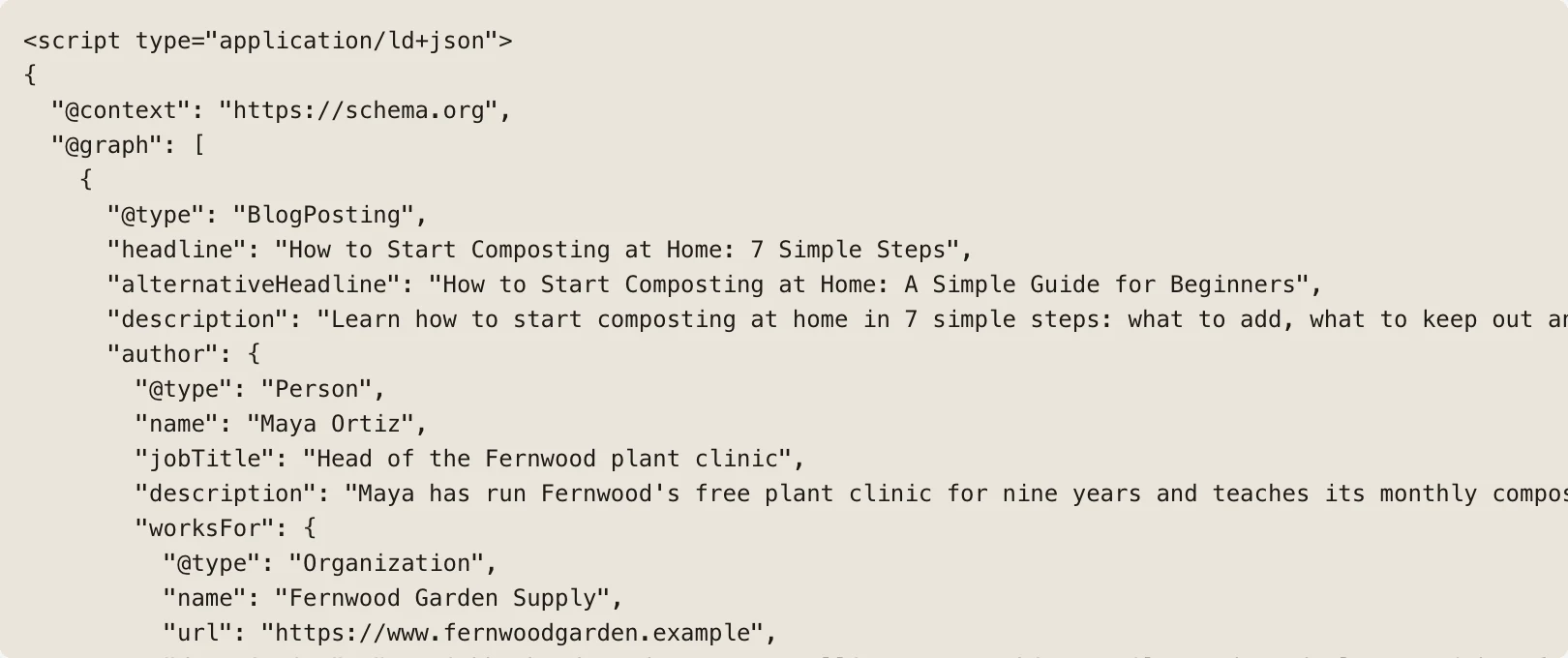
Embed the video directly under the opening answer, so a reader who wants to watch can, and one who wants to read is not pushed down the page. Then describe it with VideoObject structured data, which tells Google what the video is, when it was published and where its thumbnail lives.
One honest limit first. Google's video documentation says that for video features, "the video must be embedded on a watch page". It defines a watch page as one whose "main purpose is to show users a single video".
A blog post where the video is supporting material is not a watch page. So Google's video features need the video to be on YouTube or on its own page, and the post ranks as text. That is Google's documentation as of October 2026, not a prediction.
The markup still earns its place. Google's VideoObject documentation lists three required properties: name, thumbnailUrl and uploadDate. It recommends description, duration and embedUrl, "a URL pointing to a player for the specific video". The thumbnail must be a real image Google can fetch, "minimum 60x30 pixels, larger preferred".
For key moments, Google says it "tries to automatically detect the segments in your video". You can also add Clip markup to "specify the exact start and end time to each segment, and what label to display for each segment". Your transcript timestamps are those segments. Our post on what structured data a blog post needs covers the rest.
How do you quote the speaker word for word?
Quote the speaker once or twice, word for word, with their name in the same sentence, where their words make the point better than a paraphrase would. Never tidy the grammar, never merge two sentences from different minutes into one, and never quote what they did not say.
Quotations are one of the three things the Princeton paper found lift a page into AI answers. Aggarwal and colleagues reported in 2023 that adding citations, quotations and statistics can boost visibility by up to 40 percent in generative engine responses. On a page built from your own video, the quotation also does something no outside source can: it puts first-hand experience on the page in the owner's voice.
Choose the sentences a stranger could not have written: the mistake you made, the number you measured, the rule you follow. Say Clockbird's founder explains on video why the app rounds to six minutes (Clockbird is a fictional example). That explanation belongs on the page in her words, as spoken, with her name and the timestamp.
How do you use frames from the video as images?
Frames from the video are the post's own images. Take a screenshot of the thing being shown at a quarter, half and three quarters of the way through, each with alt text that says what is on screen. They are original, they match the text, and they cost nothing.
Google's image documentation asks for "filenames that are short, but descriptive" and says to "make sure images are placed near relevant text". So the frame of the rounding setting sits under the paragraph about rounding, named rounding-setting.jpg. Its alt text says what the frame shows: "Clockbird's rounding setting set to six minutes".
The W3C's transcripts guidance adds the accessibility reason: "transcripts should include important visual information for those not seeing the video". A frame with descriptive alt text is that visual information, in a form a screen reader and an image search can both use. Our post on whether blog posts need images to rank covers what frames do and do not do for rankings.
Key takeaways
- A transcript is an accessibility aid, not a blog post; write notes, then write the page for the search.
- Open the transcript from the description with "Show transcript" and check names and numbers against the audio.
- Embed the video under the opening answer and add VideoObject with name, thumbnailUrl and uploadDate.
- Google's video features need a watch page, so the post ranks as text; the markup still tells Google what the video is.
- Quote the speaker word for word, once or twice, and use frames from the video as the images.
Frequently asked questions
Does the blog post compete with the video for the same search?
Rarely in a way that hurts, and nobody publishes a figure on it. In our experience the video shows in YouTube and in Google's video results, while the post shows in the web results for the same phrase. Google's guide to its ranking systems says its site diversity system "generally won't show more than two web page listings from the same site" in top results.
Should the post go live before or after the video?
After the video is public, or the same day. The embed and the VideoObject markup point at the video. The uploadDate property has to be the real date the video was first published, so a post that goes live first has nothing to point at. Publish the video, then the post, then link the post from the video description.
How long should the post be compared with the video?
As long as the search needs, not as long as the video runs. In our experience a ten-minute video gives enough material for a 1,200 to 1,500 word post. A thirty-minute video gives enough for two or three posts on different searches. Cut what the video says that the searcher did not ask about.
How to turn a YouTube video into a blog post that ranks, in one list
Notes, not a transcript; a page written for the search, answer first; the video under the answer with VideoObject markup; the speaker quoted word for word; frames as the images. If you would rather paste the link and have the notes, the page, the markup and the frames done for you, try one article free.
Sources
- Basic transcripts are a text version of the speech and non-speech audio information needed to understand the content
- original information, reporting, research, or analysis
- you can see the full transcript of any video that has captions
- the video must be embedded on a watch page
- name, thumbnailUrl and uploadDate
- can boost visibility by up to 40 percent in generative engine responses
- filenames that are short, but descriptive
- generally won't show more than two web page listings from the same site
This post was written and checked with the same rules PARCHMNT applies to every page it writes for a customer: researched against what ranks today, answer first, every figure with a source.
Try 1 article free