Why Is My Blog Post Not Ranking? Six Causes to Check in Order
The honest answer to "why is my blog post not ranking" is almost always one of six causes. Check them in order: not indexed, the wrong intent, too little authority, a saturated search, two of your own pages competing, or a title nobody clicks. Each has a check that takes minutes and a fix you can make this week.
This post is built on Google's Search Console help, its How Search Works pages and two studies we opened. The order is the one we use ourselves, cheapest check first.
Is the blog post indexed at all?
A page Google has not indexed cannot rank, so check indexing first. Paste the address into Google Search Console's URL Inspection tool. If the verdict is "URL is on Google", move to the next cause. If not, the status underneath says why.
Google's help says "URL is on Google" means eligible, not guaranteed, and that requesting indexing does not guarantee indexing. Two statuses matter most, as defined in the Page indexing report help. "Discovered - currently not indexed" means Google found the address but has not fetched it. "Crawled - currently not indexed" means Google read the page and chose not to add it, for now.
Rule out two self-inflicted causes too: a noindex tag, and a robots.txt rule that blocks Googlebot. The Robots Exclusion Protocol, RFC 9309, says its allow and disallow lines "indicate whether accessing a URI that matches the corresponding path is allowed or disallowed". A disallowed page is never fetched.
- Not found at all: link to it from your home page and list it in your sitemap. Our post on how long Google takes to index a new page gives realistic waits.
- Discovered, not crawled: wait two weeks, then request indexing once.
- Crawled, not indexed for a month: Google declined. Treat it as a quality or duplicate problem and keep reading.
Does the post match the search intent?
A post that answers a different question from the one people typed will not rank. Search the phrase and look at what kind of pages hold the first page: guides, lists, product pages, videos or forum threads. Your post has to be the same kind of page.
Google's How Search Works pages describe the first step of ranking as working out "the intent behind your query". They add that "the most basic signal that information is relevant is when content contains the same keywords as your search query".
Mismatched intent is one of three reasons Ahrefs gives for no traffic, in a 2023 study that found 96.55 percent of about 14 billion pages got nothing from Google. Clockbird, a fictional time-tracking app we use as an example, cannot rank "time tracking tips" for "best time tracking app for freelancers": that first page is comparison lists. The fix is a new opening that answers the exact question, in the first page's format.
Does the site have the authority the search needs?
Some searches are decided by trust in the site rather than by the page. Google says its systems look for signals of expertise, authoritativeness and trustworthiness, and that links from other prominent websites are one sign. A newer site with few links will lose those searches for a while.
The source is the quality section of Google's How Search Works pages, which is vague about weights. Nobody publishes how many links a page needs, because it depends on who holds the spots. In Ahrefs' study, having no backlinks was the second reason pages got no traffic.
The fix is not to buy links. Pick searches your site can win now. First pages with forum threads, videos and thin pages are open to a complete page from a small site; those held by documentation and major publishers are not yet. Our guide to checking whether a keyword is worth writing about shows how to read that.
Is the search saturated?
A saturated search is one where official documentation and major publishers hold nearly every spot on the first page. A post from a newer site can be complete and accurate and still sit on page three, because nothing on page one is weak enough to pass.
Count the spots held by encyclopedias, major publishers, big retailers, platforms and official sites, then the openings: forum threads, Q&A sites, videos, and thin or old posts. By our rule, major sites on six or more spots with at most one opening is saturated; three or more openings is winnable. When we read the first page for this search, it held small blogs, a WebmasterWorld thread and thin posts.
PARCHMNT is a writing tool that researches what ranks for a search, writes the page, checks every claim and tracks where it lands in Google and AI answers. Its keyword check does this count before an article is written and returns one of four verdicts, with the narrower searches from People Also Ask. Google does not publish search volume outside Google Ads, so the check never guesses volume. The fix for a saturated search is a narrower one.
Are two of your pages competing for the same search?
Two pages from one site aimed at one search split the clicks and the links between them, and often neither ranks as well as one would. Open the Performance report in Search Console, filter by the exact query, and switch to the Pages tab. Two pages with impressions means they compete.
Google Search Central's documentation on canonicalization says near-identical pages are clustered and one is shown as the canonical, and that your preference "is a hint, not a rule". For two posts that are merely close, Google may rank both at middling positions and alternate between them. The chart in Search Console hides this. Its average position is actually "the average position of the topmost result from your site", so the weaker page only shows in the table.
Repoint one page at a different search, merge the two and redirect the weaker address, or link the weaker to the stronger; our post on telling whether two pages compete for the same search walks through each.
Is the title getting clicks?
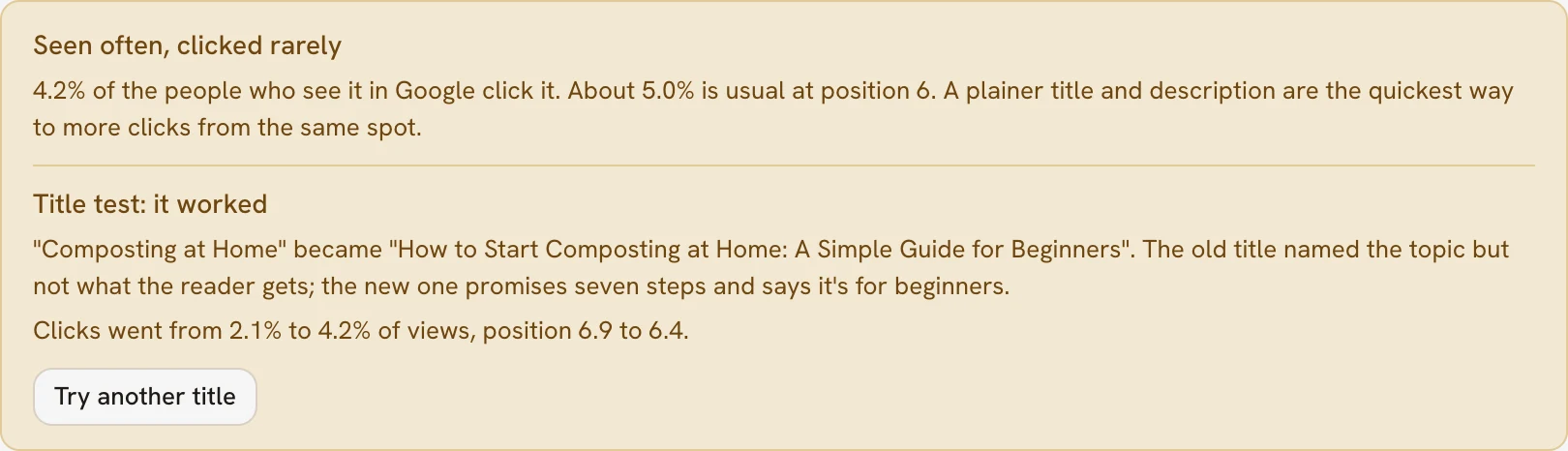
A post can rank on page one and still look like it is not ranking, because nobody clicks it. In Search Console, compare the post's click-through rate with what its position should earn. A dull or misleading title loses clicks at any position.
As of October 2026, First Page Sage's study of 1,184 domains puts the click rate for position one at 22.6 percent without an AI answer and 3.6 percent with one. An AI answer there means an AI Overview or an AI Mode response. The top three earn most clicks, and an AI answer takes most of them even from the top spot.
If the position is fine and the clicks are not, rewrite the title to say what the reader gets, in their words, and test it for a few weeks. Our post on writing a title tag that gets more clicks covers the test. Under an AI answer, the title matters less than whether the answer cites you.
The six causes in one table
The table puts the six causes in the order to check them, with the symptom, the check and the fix. Work down it and stop at the first row that matches.
| Cause | Symptom | Check | Fix |
|---|---|---|---|
| Not indexed | No impressions | URL Inspection | Link to it, submit the sitemap, wait |
| Wrong intent | Impressions, poor position | Compare the post's shape with the first page | Rewrite the opening in the first page's format |
| Too little authority | Position twenty to fifty on a search held by major sites | Count the major sites on page one | Target searches with openings; earn mentions |
| Saturated search | A complete post stuck on page three | Count the openings on page one | Write the narrower questions |
| Competing pages | Two of your pages in the Pages tab | Filter the Performance report by query | Repoint, merge, or link weaker to stronger |
| Dull title | Good position, low click-through rate | Compare clicks with position | Rewrite the title, then test it |
Key takeaways
- Check indexing first: a page that is not on Google cannot rank, and URL Inspection tells you in seconds.
- Read the first page for intent, authority and saturation before rewriting anything.
- Position one earns 22.6 percent of clicks without an AI answer and 3.6 percent with one, so a good position with a dull title still loses.
Frequently asked questions
Does requesting indexing make a post rank faster?
No. Requesting indexing asks Google to crawl the address sooner, and Google's help says the request does not guarantee indexing, let alone ranking. Ranking is a separate judgment made after indexing. Use it once, then work through the causes above.
Should you delete a blog post that is not ranking?
Not as a first step: a post that is not ranking usually has a fixable cause, and deleting it loses its links and history. Delete or merge it when it duplicates another page or its search has no demand, and redirect the old address.
How many backlinks does a blog post need to rank?
Nobody publishes a number, and the honest answer is that it depends on who holds the spots. A specific question with forum threads on page one can be won with no links; a broad search held by major publishers may not be won with dozens.
Why is my blog post not ranking, in one pass
Check indexing, intent, authority, saturation, competing pages and the title, in that order, and stop at the first cause that matches. Most of the fixes are cheap: a new opening paragraph, a narrower search or a merge. If you want the search read and the checks run before the article is written, try one article free.
Sources
- does not guarantee indexing
- Page indexing report help
- indicate whether accessing a URI that matches the corresponding path is allowed or disallowed
- How Search Works pages
- 96.55 percent of about 14 billion pages got nothing from Google
- is a hint, not a rule
- the average position of the topmost result from your site
- 22.6 percent without an AI answer and 3.6 percent with one
This post was written and checked with the same rules PARCHMNT applies to every page it writes for a customer: researched against what ranks today, answer first, every figure with a source.
Try 1 article free